
TL;DR
- Macros automate complex button sequences with millisecond precision impossible for human hands
- Different game genres benefit uniquely – from MMORPG rotations to FPS movement tech
- Balance performance gains against account risks – many competitive games ban automation
- Use peripheral software like LORGAR Platform for safe creation with advanced customization
- Always test macros thoroughly and stay updated on individual game policies to avoid bans
When you watch elite gamers execute flawless combos with inhuman speed, you’re witnessing the power of macro automation. These aren’t complex programming projects or cheating tools – they’re sophisticated assistants that transform your gaming experience when implemented correctly. This comprehensive guide demystifies macros from fundamental concepts to professional implementation strategies.
So what exactly constitutes a gaming macro? At its core, a macro represents a programmable instruction sequence that triggers multiple in-game actions from a single button press. Think of it as delegating repetitive tasks or technically demanding sequences that typically require perfect timing across multiple keystrokes. For example, instead of manually pressing five separate keys for an optimal damage rotation in an MMORPG, a well-designed macro executes the entire sequence automatically. In competitive shooters, macros can manage weapon recoil patterns or execute advanced movement techniques that separate average players from champions.
MMORPGs (World of Warcraft, Final Fantasy XIV):
- Automated crafting sequences that maximize item quality and efficiency
- Damage-per-second rotation macros that execute perfect ability sequences
- Raid communication macros for instant callouts and coordination
- Intelligent targeting systems that prioritize specific enemy types or critical allies
MOBAs (League of Legends, Dota 2):
- Ward-jumping combinations executed with frame-perfect timing
- Multi-item activation sequences during intense teamfight situations
- Quick-cast configurations for precision skill shot execution
- Strategic chat macros for objective timing and team coordination
FPS Games (CS:GO, Valorant):
- Bunny hop automation for advanced movement optimization
- Rapid weapon switching combinations for optimal engagement transitions
- Grenade trajectory assistants for consistent utility execution
- Economy round quick-purchase sequences for time-efficient buying phases
Fighting Games (Street Fighter, Tekken):
- Complex combo inputs requiring sub-100 millisecond precision
- Defensive option select macros for optimal counter-play situations
- Advanced movement techniques including wave dashing and character-specific tech
Understanding the technical foundation of macros helps you create more effective automation. At the system level, macros function by emulating keyboard and mouse inputs that your computer interprets identically to physical interactions. This low-level system communication creates their incredible power while making detection challenging for anti-cheat systems.
Precision timing separates amateur macro users from professionals. We’re discussing millisecond-level control – most macro software permits interval adjustments down to single milliseconds, granting unprecedented command over action sequences that human consistency cannot replicate. In fighting games, 50 milliseconds might determine whether a combo connects or whiffs, while in shooters, similar timing differences separate controlled recoil from wild inaccuracy.

Several compelling motivations drive gamers to implement macro automation in their gameplay strategies.
First and foremost, macros rescue you from monotonous repetition. Whether you’re farming resources in RPGs, mass-producing crafted items, or executing rotation sequences, macros conserve valuable time while protecting your hands from strain and potential injury.
Macros also democratize competitive gaming for older players or those with limited budgets. Let’s face reality – not every gamer possesses the finger dexterity of professional esports athletes or can afford premium gaming peripherals. Macros bridge this gap by translating complex game mechanics into accessible gameplay experiences.
Many dedicated players embrace the intellectual challenge of scripting optimal macros, fine-tuning millisecond intervals, and discovering new automation opportunities. This often evolves into a meta-game where players invest as much time optimizing their automation systems as actually playing the game itself.
Benefits of Using Macros
Gaming macros deliver advantages extending far beyond simple convenience. One significant benefit involves transforming complex sequences into reliably repeatable performances. In timing-critical genres like fighting games or MOBAs, macros guarantee frame-perfect input consistency during combat situations where human performance naturally fluctuates. This reliability converts occasional successful execution of difficult techniques into consistently available tools within your arsenal.
Human players make mistakes under pressure, but macros eliminate missed inputs, incorrect key presses, or timing errors that can cost critical milliseconds in competitive matches. When victory hinges on executing a specific combo or ability sequence flawlessly, removing mechanical execution barriers transforms challenging tasks into manageable operations.
Contemporary macro software offers extensive customization capabilities surpassing basic button remapping. Gamers can tailor macros to complement their skill levels, character specializations, or strategic preferences. We’re discussing genuinely sophisticated possibilities: timing adjustments to compensate for network latency, conditional deactivation based on specific circumstances, and even context-sensitive activation that adapts behavior according to your current game mode or character selection. This comprehensive adjustability ensures macros evolve alongside your improving skills rather than becoming restrictive dependencies.
Addressing health considerations momentarily, macros provide valuable physical benefits by minimizing repetitive strain injuries. Gaming-related medical conditions like carpal tunnel syndrome or tendonitis frequently result from performing identical actions repeatedly. Implementing macros helps prevent these injuries by redistributing workload across different input methods. This proves particularly significant for players engaging in extended gaming sessions and those already experiencing discomfort from prolonged play.

Risks & Why Macros Are Often Banned
Despite their utility advantages, macros occupy contentious territory in competitive gaming landscapes, making risk awareness essential before beginning macro development.
The fundamental issue involves competitive integrity. In player-versus-player scenarios, macros can circumvent intended game design principles. Imagine a shooter where competitors utilize recoil control automation – they’re effectively neutralizing fundamental balancing mechanics designed to regulate weapon effectiveness. This creates unfair competitive environments.
Modern anti-cheat systems employ increasingly sophisticated detection methodologies. These advanced programs identify various macro usage patterns through multiple indicators: non-human input consistency (perfect timing repetition), third-party software injection detection, suspicious action pattern consistency, and automated behavior signatures matching known macro profiles. Detection consequences shouldn’t be underestimated and frequently result in permanent account restrictions.
Major competitive titles maintain zero-tolerance policies toward macro automation. Games like Fortnite, Valorant, and ranked World of Warcraft explicitly prohibit most automated behaviors within their Terms of Service agreements. We’re discussing temporary suspensions ranging from weeks to permanent bans, potentially costing years of progression and significant financial investments. Gamers must carefully evaluate worst-case scenarios: does potential performance enhancement justify risking accounts developed since their initial creation?
Community reputation represents another critical consideration. Even when technically permissible, macro usage can damage your standing among fellow players, who may perceive it as unfair advantage or “soft cheating” exploitation. Nobody desires becoming the player whose automation gets publicly exposed during gameplay sessions.
What Is Allowed and What Isn’t
Understanding the distinction between acceptable and prohibited macro applications represents essential knowledge for any gamer considering automation implementation.
So what typically receives approval? Simple one-to-one macros binding single buttons to individual actions generally gain acceptance. Quality-of-life enhancements that don’t disrupt competitive equilibrium typically receive passes as well. Accessibility macros assisting players with disabilities? Completely legitimate. Chat automation or emote shortcuts rarely face punishment. Additionally, games featuring integrated macro systems guarantee safe utilization of those specific features.
Now addressing prohibited territory. Recoil control automation eliminating weapon spread patterns? That guarantees restrictions! Automated clicking systems and rapid-fire sequences exceeding human capability thresholds will trigger detection rapidly. Movement macros creating perfect bunny hops or similar mechanical exploits invite disciplinary action. Any farming automation or unattended macro operation falls clearly outside acceptable boundaries. Similarly, any macros interacting with game memory or providing normally inaccessible information.
Note that the common question “Can Steam ban for macro?” lacks straightforward resolution. Steam’s platform generally doesn’t prohibit macro usage, but individual games distributed through Steam absolutely can and do enforce their own policies. Each title operates its own anti-cheat system with individual enforcement standards. VAC (Valve Anti-Cheat) primarily targets memory-based cheating modifications, but game-specific protection systems like EasyAntiCheat or BattlEye actively target macro users. Essential guidance? Familiarize yourself with each specific game’s regulations and never assume universal policy application.
How to Create a Macro
For gamers considering implementing automation in single-player environments or games explicitly permitting macros, here’s your implementation roadmap.
Using Gaming Peripheral Software
LORGAR gaming peripherals integrate macro creation tools directly within LORGAR PLATFORM software, creating accessible automation development for all skill levels.
Step-by-Step Process:
-
- Install the Software: Download and install LORGAR Platform from official sources
- Access Macro Section: Navigate to your keyboard or mouse configuration settings and identify the macro management interface
- Create New Macro: Select “Create” option
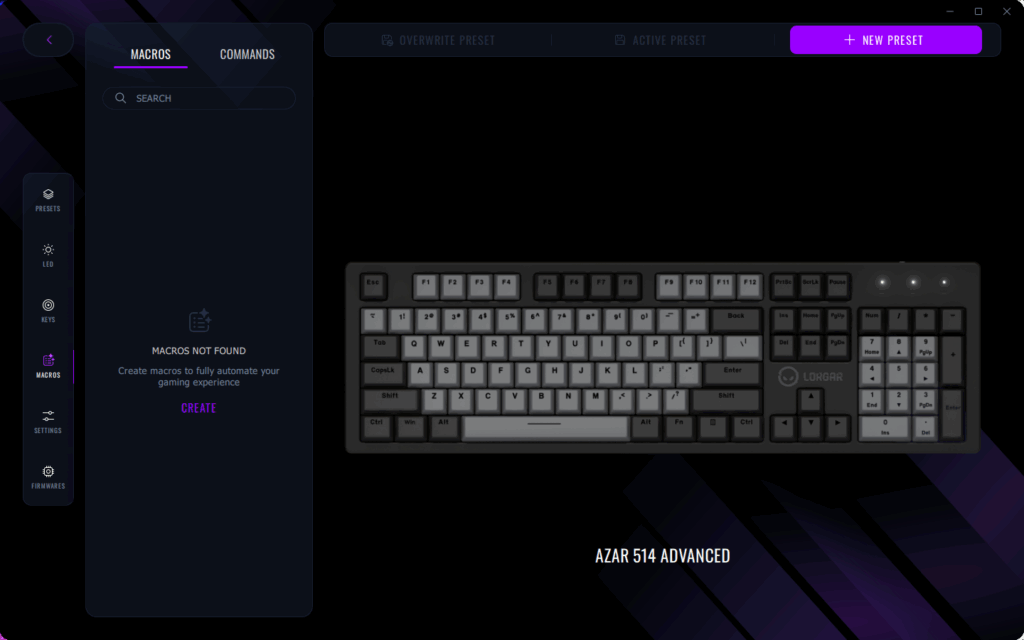
- Recording Methods:
- Recording live: Choose “Start Recording” and perform your desired action sequence
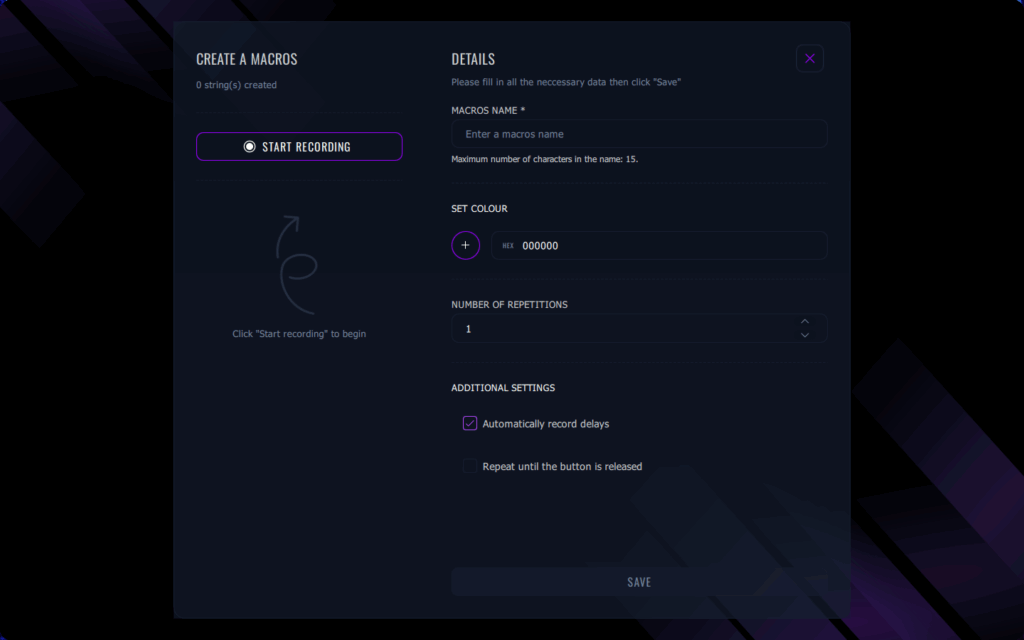
- Manual input: Edit individual keystrokes with intentional timing intervals. You can add or remove specific actions.
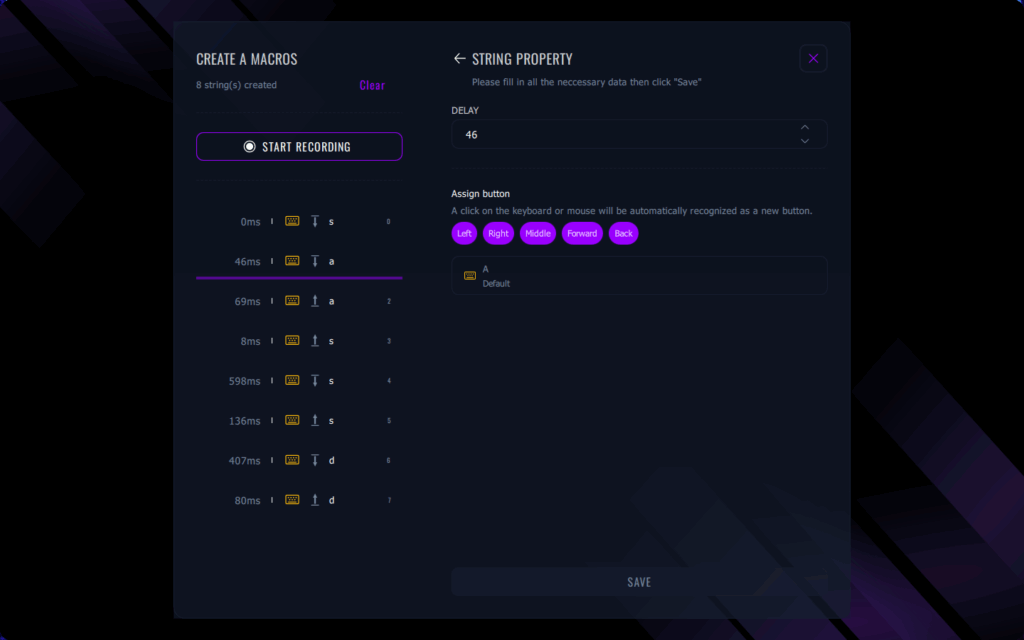
- Recording live: Choose “Start Recording” and perform your desired action sequence
- Fine-tune Timing: Configure time intervals between actions for optimal performance. The “Automatically record delays” option remains selected by default, capturing all timing delays in milliseconds. Deselecting this option saves all actions with 0 ms delays for immediate execution or simplified manual adjustment.
- Administrative Actions: Assign descriptive names and color codes (using HEX # format) for improved macro identification
- Define number of repetitions: “1” represents the default setting, meaning the macro executes its sequence once per assigned button activation. Selecting “Repeat until the button is released” enables continuous repetition mode.
- Assign to Button: Return to available macro listings and designate which physical key or button will trigger your automation sequence
- Save and Test: Always validate functionality in safe environments before competitive implementation
- Copy and Edit: For creating multiple variations of similar macros, rather than recording from initialization each instance, you can duplicate existing macros and modify specific parameters as required.
Third-Party Software Solutions
While presenting higher risks in multiplayer contexts, third-party macro software unlocks advanced capabilities sometimes unavailable in standard peripheral applications like LORGAR Platform. AutoHotkey for Windows maintains its reputation as the premier macro development platform through its powerful scripting language enabling sophisticated conditional automation creation. Basic programming comprehension becomes necessary to fully leverage its potential, but its free open-source nature makes cost-effectiveness unbeatable.
If coding represents an obstacle, numerous gaming-focused alternatives provide more approachable methodologies. X-Mouse Button Control specializes specifically in mouse button customization with integrated macro support. AutoIt delivers alternative scripting solutions with slightly reduced learning curves compared to AutoHotkey. For users preferring extreme simplicity, Macro Recorder and JitBit Macro Recorder offer straightforward record-and-playback functionality without demanding technical expertise. Each solution presents unique strengths and limitations, making appropriate selection dependent on your technical proficiency and specific automation objectives.
Advanced Macro Techniques
Once you’ve mastered foundational concepts, macro development can progress toward sophisticated implementations. Explore these advanced methodologies that elevate automation possibilities.
Conditional macros represent the initial advancement tier. These intelligent automation systems execute only when specific game-state conditions become satisfied. Perhaps when ability cooldowns complete, when health drops below critical thresholds, or when specific enemy types enter engagement range. Now instead of spamming inputs randomly, you’re developing smart automation that interprets game conditions and responds contextually. It’s comparable to having an automated assistant monitoring your situational awareness.
Toggle macros significantly enhance ergonomic comfort! Why maintain constant key pressure for auto-run functionality when toggle activation suffices? These prove exceptionally valuable for MMO channeled abilities or sustained firearm operation in shooters. Remember: significant capability demands proportional responsibility. You must retain ultimate control over character actions.
Want to implement truly sophisticated automation? Multi-level macros integrate multiple simple macros into adaptive sequences. Consider combat automation that adjusts its rotation based on whether you’re engaging bosses or standard enemies, or automation that modifies behavior according to target distance. These scripting systems can achieve complexity levels approaching simulated expert decision-making processes, though realistically developing such systems requires substantial time investment and comprehensive game knowledge.
Here’s professional guidance that might protect your account: Implement randomization within your macros. By incorporating variable delays or minor execution variations, you avoid triggering anti-cheat detection through excessively robotic precision patterns. We’re discussing millisecond-level variations – sufficient to create human-like characteristics without compromising combo reliability. Remain aware that regardless of randomization sophistication, these automation systems might still violate specific game regulations, so exercise caution regarding implementation contexts.
Best Practices for Macro Creation
✔️ Take it slow: You don’t require advanced programming expertise to develop effective macros, but simpler implementations work optimally during initial learning phases. Master core principles before advancing toward complex automation.
✔️ Record Everything: Maintain comprehensive documentation systems including:
- Macro identification names and functional purposes
- Key binding assignments and activation methods
- Game-specific implementation contexts
- Creation dates and modification histories
- Special conditional requirements or environmental dependencies
✔️ Version Control: Archive iterations of your most critical macros. If game updates disrupt functionality, you maintain rollback capability.
✔️ Routine Testing: Macros frequently malfunction following game patches. Validate your automation systems post-update.
✔️ Back your Profiles up: Regularly export configuration profiles. Hardware malfunctions or software upgrades can permanently erase your custom settings.
✔️ Community Resources: Many gaming communities distribute functional macro examples. These resources serve as valuable learning materials or inspiration sources for developing your own automation systems.

Conclusion
Understanding gaming macro fundamentals unlocks new entertainment dimensions while enhancing your gameplay experiences. Although they deliver undeniable performance, accessibility, and flexibility advantages, responsible implementation within developer-established guidelines remains paramount.
Essential insight: macros enhancing single-player immersion or functioning as accessibility accommodations represent positive gaming enhancements. However, leveraging automation for unfair competitive advantages in multiplayer environments? That enters questionable ethical territory and jeopardizes your account security.
Gaming technology evolves continuously, but discussions regarding macro legality persist indefinitely. Some newly released titles integrate macro-like functionality directly into gameplay systems; others intensify enforcement against external automation. The intelligent approach? Maintain current knowledge regarding individual game policies, and when uncertain, avoid unnecessary risks. Ultimately, games exist for enjoyment, not exploitation.
Beyond performance enhancements, macros deliver significant ergonomic advantages by minimizing repetitive finger movements. Common gaming-related injuries like carpal tunnel syndrome and tendonitis typically develop from performing identical actions repeatedly over extended periods. Implementing macros strategically helps prevent these conditions by redistributing workload across multiple buttons, significantly reducing strain on individual digits. This protection proves invaluable for dedicated players logging multiple daily hours and those experiencing physical fatigue from marathon sessions. For optimal hand health, consider alternating between different macro configurations and taking regular breaks to maintain circulation.
Professional esports athletes frequently incorporate macro usage into their training regimens specifically to maintain long-term competitive viability. The cumulative effect of thousands of repeated keystrokes can lead to chronic pain conditions that may require medical intervention if left unaddressed.
Despite their utility, macros occupy contentious territory in competitive environments, making risk awareness essential before implementation. The core issue revolves around competitive integrity – in player-versus-player situations, automation can circumvent intended game mechanics. Consider a tactical shooter where competitors employ recoil compensation macros, effectively neutralizing a core balancing element designed to limit weapon effectiveness. This undermines the skill-based foundation that makes competitive gaming rewarding.
Modern anti-cheat systems have evolved sophisticated detection capabilities. These advanced programs analyze input patterns for telltale signs of automation: perfectly consistent timing across executions, third-party software interactions with game processes, unnaturally precise action sequences, and automated behavior patterns matching known macro signatures. Penalties for violation range from temporary suspensions to permanent account termination.
Leading competitive titles maintain zero-tolerance policies toward unauthorized automation. Games like Fortnite, Valorant, and competitive World of Warcraft explicitly prohibit most automated functions in their terms of service. Consequences include weekly suspensions or year-long bans, potentially costing players years of progression and purchased content. Before implementing any automation, carefully evaluate whether potential advantages justify risking an account cultivated since its creation.
Community perception represents another critical consideration. Even when technically permissible, macro usage can damage your reputation among fellow players, who may perceive it as gaining unfair advantage or “soft cheating.” Nobody enjoys becoming the player whose automated actions generate criticism in public channels.
Distinguishing between acceptable and prohibited automation represents essential knowledge for any gamer considering macro implementation. Understanding these boundaries helps maintain both account security and gaming integrity.
Generally permitted macros include straightforward one-to-one keybinding that assign single actions to individual buttons. Quality-of-life improvements that don’t disrupt competitive equilibrium generally receive approval. Accessibility configurations assisting players with disabilities typically gain full legitimacy. Communication shortcuts and emote macros generally avoid penalties. Games featuring built-in macro systems provide safe, sanctioned automation options.
The prohibited category clearly includes recoil management macros that eliminate weapon spread patterns – these reliably trigger account restrictions. Automated clicking systems and rapid-fire sequences exceeding human capability quickly attract scrutiny. Movement automation creating perfect bunny hops or similar exploits invite disciplinary action. Any farming automation or unattended macro operation falls outside acceptable parameters. Similarly forbidden are macros that interact with game memory or provide information normally inaccessible to players.
Regarding the common question “Can Steam ban for macro usage?” – the answer involves nuance. While Steam’s platform generally doesn’t issue bans specifically for macros, individual games hosted on Steam absolutely can and do enforce restrictions. Each title operates its own anti-cheat system with unique enforcement policies. Valve’s VAC system primarily targets memory manipulation cheats, while game-specific protection like EasyAntiCheat or BattlEye actively target macro users. The essential principle? Familiarize yourself with each specific game’s regulations and never assume consistency across titles. For comprehensive guidance on navigating modern military shooters, consult our Battlefield 6 Complete Guide for detailed strategies.
For players considering automation in single-player experiences or explicitly permitted contexts, here’s the implementation methodology.
Using Gaming Peripheral Software
LORGAR gaming keyboards and mice include integrated macro creation tools within the LORGAR PLATFORM software, designed for accessibility across skill levels.
Step-by-Step Process:
-
- Install the Software: Download and install the LORGAR Platform application
- Access Macro Section: Navigate to your keyboard or mouse configuration settings and identify the macro management interface
- Create New Macro: Select the “Create” option to initialize new macro development
- Recording Methods:
- Recording live: Click “Start Recording” and perform your desired action sequence
- Manual input: edit each character separately with intentional wait times. You can add or delete each character.
- Recording live: Click “Start Recording” and perform your desired action sequence
- Fine-tune Timing: Configure precise intervals between actions for optimal performance. The “Automatically record delays” option defaults to active, capturing timing data in milliseconds. Deactivating this feature saves all actions with 0 ms delays for immediate execution or simplified manual adjustment.
- Administrative Actions: assign descriptive naming and color coding (using HEX values) to enhance macro identification and organization.
- Define number of repetitions: The default “1” setting executes the sequence once per button activation. Selecting the “Repeat until button release” option enables continuous repetition functionality.
- Assign to Button: Return to available macro listings and designate which physical key or button will trigger your automation sequence.
- Save and Test: Always validate functionality in controlled environments before deploying in critical scenarios.
- Copy and Edit: Instead of recreating similar macros from initialization, duplicate existing configurations and modify specific parameters as needed.
When exploring weapon systems that might benefit from automation, our BF6 Weapons Unlock Guide provides essential context for making informed decisions about implementation strategies.
When you watch professional gamers execute flawless sequences with inhuman precision, you’re likely witnessing macro automation in action. These powerful tools transform complex multi-key combinations into single-button executions, revolutionizing how players interact with games. For newcomers, macros might appear as complex programming or even cheating mechanisms, but they’re actually sophisticated tools that enhance gameplay when used responsibly.
A macro functions as a programmable command sequence that enables users to trigger multiple in-game actions through a single key press. Think of it as automating repetitive tasks or executing difficult combinations that normally demand perfect timing and multiple keystrokes. In MMORPG environments, instead of manually pressing five separate keys for ability rotations, a well-designed macro can execute the entire sequence automatically. In competitive shooters, macros can manage weapon recoil patterns or perform advanced movement techniques that would be challenging to execute consistently.
MMORPGs (World of Warcraft, Final Fantasy XIV):
- Automated crafting sequences that optimize item quality and production efficiency
- Perfect DPS rotation sequences that maximize damage output
- Raid communication macros for coordinated team strategies
- Intelligent targeting systems that prioritize specific enemy types or allies
MOBAs (League of Legends, Dota 2):
- Frame-perfect ward-jump combinations for advanced positioning
- Item activation sequences during intense teamfight engagements
- Quick-cast optimization for skill shot accuracy
- Strategic chat macros for objective timing and team coordination
FPS Games (CS:GO, Valorant):
- Bunny hop (bhop) macros for advanced movement optimization
- Weapon switching combinations for tactical advantage
- Grenade trajectory assistants for precise lineup execution
- Economic quick-buy sequences for round optimization
Fighting Games (Street Fighter, Tekken):
- Complex combo inputs requiring sub-second timing precision
- Option select macros for defensive strategy execution
- Advanced movement techniques like wave dashing
- Character-specific technical maneuvers requiring precise execution
Understanding the technical foundation of macros reveals their true potential. At the system level, macros operate by emulating keyboard and mouse inputs, communicating identical signals to your computer as physical key presses would. This low-level interaction creates their power while making detection challenging for anti-cheat systems.
Timing precision separates amateur macro users from professionals. We’re discussing millisecond-level accuracy that most macro software enables through precise interval configuration. This granular control allows for action sequences that would be impossible to execute consistently through manual input alone. A difference of 50 milliseconds can determine whether you land a critical combo in a fighting game or maintain perfect recoil control in a shooter.
Multiple compelling reasons drive gamers toward macro automation, each addressing different aspects of the gaming experience.
Primary motivation stems from eliminating repetitive task execution. Whether gathering resources in RPGs, mass-producing craftable items, or executing ability rotations, macros conserve valuable time while reducing physical strain on fingers and wrists.
Macros create competitive accessibility for players with physical limitations or budget constraints. Let’s acknowledge reality: not every gamer possesses the finger dexterity of professional esports athletes or can invest in premium gaming peripherals. Macros bridge this gap by translating complex game mechanics into accessible gameplay experiences.
Many enthusiasts find deep satisfaction in the technical challenge of scripting optimal macros. The process involves meticulous timer adjustment and discovering new automation opportunities, effectively creating a meta-game within the primary gaming experience. Some dedicated players spend equivalent time optimizing their macro configurations as they do actually playing the game!
Gaming macros deliver advantages extending far beyond simple convenience. The most significant benefit involves transforming complex sequences into reliably executable actions. In timing-critical genres like fighting games or MOBAs, macros ensure frame-perfect input consistency during combat situations that would be challenging for human players to maintain. This reliability converts occasional successful execution of difficult techniques into consistently available tools within your arsenal.
Human error under pressure becomes eliminated through macro automation. Preventing missed inputs, incorrect key presses, or timing errors saves precious milliseconds in competitive scenarios. When victory depends on executing critical combinations or ability sequences where mistakes in complex finger movements could be costly, you’ve effectively removed mechanical skill barriers.
Contemporary macro software provides extensive customization capabilities beyond basic button remapping. Players can tailor macros to complement their skill levels, character specializations, or strategic preferences. We’re discussing genuinely advanced functionality: timing adjustments to compensate for latency, conditional deactivation based on specific circumstances, and even context-sensitive activation that adjusts behavior according to game mode or character selection. This comprehensive customization ensures macros evolve with improving player ability rather than becoming restrictive crutches.
Considering physical health, macros offer substantial benefits by reducing repetitive motion injuries. Gaming-related conditions like carpal tunnel syndrome or tendonitis frequently result from repeating identical actions extensively. Macro implementation serves as preventive measure against these injuries by minimizing finger overuse through function consolidation. This proves invaluable for players engaging in extended gaming sessions and those already experiencing discomfort from prolonged play.
Risks & Why Macros Are Often Banned
Despite their utility in gaming enhancement, macros occupy controversial territory regarding competitive integrity, making risk awareness essential before creation.
The fundamental issue involves competitive fairness preservation. In player-versus-player contexts, macros can circumvent intended game design principles. Imagine a shooter scenario where players utilize recoil control macros, effectively neutralizing fundamental game mechanics designed to balance weapon characteristics. This creates unfair competitive environments.
Modern anti-cheat systems employ increasingly sophisticated detection methodologies. These advanced programs analyze various macro usage patterns, identifying non-human input characteristics (perfect timing consistency), third-party software injection, suspicious action consistency patterns, and automated behavior signatures matching known macro profiles. Detection consequences aren’t trivial and may result in account suspension or permanent banning.
Major competitive titles maintain strict policies regarding macro usage. Games like Fortnite, Valorant, and ranked World of Warcraft explicitly prohibit most automation in their Terms of Service agreements. Penalties range from temporary suspensions to extended bans, potentially resulting in loss of years of progression and purchased content. Gamers must consider worst-case scenarios: does utilizing prohibited macros justify risking accounts developed since initial creation?
Community perception represents another critical consideration. Even when technically permissible, macro usage can damage reputation among fellow players, who may perceive it as unfair advantage or “soft cheating.” Nobody desires becoming the player whose macro usage becomes publicly criticized.
What Is Allowed and What Isn’t
Understanding the distinction between acceptable and prohibited macro applications represents essential knowledge for any gamer considering automation.
Generally permissible applications include simple one-to-one macros binding single buttons to individual actions. Quality-of-life enhancements that don’t disrupt competitive balance typically receive approval. Accessibility macros for players with disabilities remain completely legitimate. Chat macros or emote shortcuts generally avoid punishment. Games featuring built-in macro systems provide safe implementation frameworks.
Prohibited territory includes recoil control macros that eliminate weapon spread patterns. Auto-clickers and rapid-fire macros exceeding human capability thresholds trigger rapid detection. Movement macros enabling perfect bunny hops or similar mechanical exploits invite disciplinary action. Automated farming bots or unattended macroing fall clearly outside acceptable parameters. Similarly, macros that interact with game memory or provide otherwise inaccessible information violate terms.
Regarding Steam platform policies, the question “Can Steam ban for macro?” lacks straightforward resolution. Steam itself generally avoids macro-related bans, but individual games on the platform absolutely can and do enforce restrictions. Each title operates its own anti-cheat system with individual enforcement policies. VAC (Valve Anti-Cheat) primarily targets memory-based cheating, while game-specific systems like EasyAntiCheat or BattlEye actively pursue macro users. Essential guidance? Familiarize yourself with specific rules for each game you play and don’t assume universal permissibility.
For gamers considering automation implementation in single-player environments or permitted contexts, follow this comprehensive creation methodology.
Using Gaming Peripheral Software
LORGAR gaming keyboards and mice integrate macro creation tools within the LORGAR PLATFORM software, providing accessible automation capabilities for all skill levels.
Step-by-Step Process:
-
- Install the Software: Download and install the LORGAR Platform application
- Access Macro Section: Navigate to keyboard or mouse settings and locate the dedicated macros section
- Create New Macro: Click “Create” button
- Recording Methods:
- Recording live: Click “Start Recording” and execute desired sequence
- Manual input: edit each character separately with intentional wait times. You can add or delete each character.
- Recording live: Click “Start Recording” and execute desired sequence
- Fine-tune Timing: Configure precise time intervals between actions for optimal performance. The default “Automatically record delays” checkbox captures all timing data in milliseconds. Deselecting this option saves all actions as 0 ms for immediate execution or simplified manual adjustment.
- Administrative Actions: assign descriptive names and color coding (using HEX values) for improved macro identification
- Define number of repetitions: Default “1” setting executes the sequence once per button press. Selecting “Repeat until the button is released” activates continuous execution mode.
- Assign to Button: Return to available macros list and designate specific keys or buttons for macro activation
- Save and Test: Always conduct testing in safe environments before implementation
- Copy and Edit: for creating multiple similar macro instances, rather than recording from scratch repeatedly, duplicate existing macros and modify specific parameters as needed.
Third-Party Software Solutions
While presenting increased risk in multiplayer settings, third-party macro software unlocks advanced capabilities beyond standard peripheral applications. AutoHotkey for Windows maintains dominance in macro creation through its powerful scripting language enabling sophisticated conditional automation. Basic programming knowledge enhances utilization potential, though the free open-source nature provides exceptional value.
For non-programmers, numerous gaming-specific tools offer user-friendly alternatives. X-Mouse Button Control specializes in mouse button customization with integrated macro support. AutoIt provides alternative scripting environment with improved accessibility compared to AutoHotkey. Users seeking simplicity can utilize Macro Recorder and JitBit Macro Recorder for straightforward record-and-playback functionality without steep learning curves. Each solution possesses distinct strengths and limitations, making selection dependent on technical proficiency and specific automation objectives.
Once foundational skills are established, macro development advances to sophisticated implementation strategies. Explore these advanced methodologies that elevate automation potential.
Conditional macros represent the first advancement tier. These intelligent automation systems execute only when specific trigger conditions occur. Examples include ability cooldown completion, health dropping below specific thresholds, or appearance of designated enemy types. Rather than indiscriminate button spamming, you’re implementing smart automation that interprets game states and responds appropriately. This creates virtual assistant functionality monitoring your gameplay.
Toggle macros significantly reduce physical strain during extended sessions! Why maintain continuous key pressure for auto-run when toggle functionality suffices? These prove invaluable for MMO channeling abilities or shooter sustained fire mechanics. Remember: significant power requires responsible management. You must retain ultimate character control.
Seeking ultimate sophistication? Multi-level macros integrate multiple simple automations into adaptive behavioral sequences. Combat macros that adjust rotation patterns based on encountering bosses versus standard enemies, or those modifying behavior according to target distance. These scripts achieve complexity levels approaching simulated player decision-making, though such development demands substantial time investment and deep game knowledge.
Professional recommendation that may protect your account: Implement randomization within macros. Incorporating variable delays or minor execution differences avoids triggering anti-cheat detection through excessively robotic precision patterns. We’re discussing millisecond-level variations – sufficient to create human-like characteristics without compromising combo reliability. Remain aware that despite randomization sophistication, usage may still violate specific game regulations, necessitating careful implementation consideration.
✔️ Take it slow: Advanced coding expertise isn’t mandatory for effective macro creation, though simplicity proves optimal during learning phases. Master fundamental principles before advancing to complex implementations.
✔️ Record Everything: Maintain comprehensive documentation including:
- Macro identification names and functional purposes
- Key binding configurations and assignment details
- Game titles where macros are implemented
- Creation dates and modification timestamps
- Special conditional requirements or operational parameters
✔️ Version Control: Archive versions of critical macros. If updates disrupt functionality, restoration remains possible.
✔️ Routine Testing: Macros may malfunction following game updates. Verify macro performance after patch installations.
✔️ Back your Profiles up: Consistently export configuration profiles. Hardware failures or software upgrades can result in configuration loss.
✔️ Community Resources: Numerous gaming communities distribute functional macros. These serve as learning resources or inspiration for custom development.
Conclusion
Understanding gaming macro fundamentals unlocks new entertainment dimensions during gameplay. While providing undeniable performance, accessibility, and flexibility benefits, responsible implementation following developer guidelines remains essential.
Critical distinction: macros enhancing single-player experiences or functioning as accessibility features represent valuable gaming additions. However, leveraging these tools for unfair competitive advantages enters problematic territory risking account security.
Gaming technology evolves continuously, though discussions regarding macro legality persist. Some new releases integrate macro-like functionality directly into game systems; others intensify enforcement efforts. Strategic approach? Maintain current knowledge of individual game policies, and when uncertain, avoid unnecessary risks. Ultimately, games exist for enjoyment, not exploitation.
While third-party macro applications present elevated risks in competitive multiplayer environments, they unlock sophisticated automation possibilities that standard gaming peripheral software frequently cannot achieve. AutoHotkey dominates the Windows ecosystem with its robust scripting framework that enables construction of intricate conditional automation sequences. Mastering this tool demands foundational programming comprehension to leverage its full potential, though its free and open-source nature provides unbeatable value for dedicated users.
For gamers uncomfortable with coding fundamentals, numerous specialized applications deliver simplified approaches to automation creation. X-Mouse Button Control focuses exclusively on mouse button remapping with integrated macro functionality. AutoIt presents another scripting alternative with gentler learning requirements than AutoHotkey. Players seeking elementary solutions will appreciate Macro Recorder and JitBit Macro Recorder, which provide basic record-and-replay features without complex setup procedures. Each application exhibits distinct advantages and limitations, making selection dependent on technical proficiency and specific automation objectives.
When evaluating third-party solutions, consider these critical factors: software detection rates by anti-cheat systems, community support availability, update frequency, and compatibility with your gaming library. Advanced users often combine multiple tools, using LORGAR Platform for basic functions while reserving AutoHotkey for complex conditional operations that require game state monitoring.
After establishing fundamental macro creation skills, you can progress to sophisticated automation methods that significantly expand functional possibilities.
Conditional macros represent the pinnacle of intelligent automation, executing only when predetermined game conditions are satisfied. These sophisticated scripts might activate when ability cooldowns complete, when health drops below specific thresholds, or when particular enemy types appear within engagement range. Rather than indiscriminately activating button sequences, you’re developing responsive automation that interprets game state data and reacts appropriately. This creates virtual assistance that monitors combat situations automatically.
Toggle macros dramatically reduce physical strain during extended gaming sessions. Why maintain constant pressure on movement keys when single-press activation suffices? These prove exceptionally valuable in MMOs for channeled abilities or shooters for continuous firing modes. Remember the fundamental principle: automation should enhance, not replace, player control and decision-making.
Multi-level macros integrate multiple simpler automations into adaptive sequences that respond to changing combat conditions. A sophisticated combat rotation might adjust based on whether you’re engaging boss enemies or standard mobs, or modify behavior according to target distance. These scripts can achieve complexity levels that mimic experienced player decision patterns, though developing such systems requires substantial time investment and deep game mechanics knowledge.
Professional gamers recommend incorporating randomization elements into your macros as an account protection measure. By introducing variable delays or minor execution inconsistencies, you avoid triggering anti-cheat detection mechanisms that identify robotic precision patterns. These timing variations operate at millisecond scales—sufficient to simulate human imperfection without compromising combo execution reliability. Understand that despite randomization sophistication, these macros may still violate specific game policies, requiring careful consideration of deployment contexts.
✔️ Progressive Learning Approach: Complex programming skills aren’t mandatory for creating effective macros, though elementary automations perform most reliably during initial learning phases. Master core principles before advancing to complex conditional systems.
✔️ Comprehensive Documentation: Maintain detailed records including:
- Macro identification and functional purpose
- Specific game applications and compatibility notes
- Creation dates and modification histories
- Special activation conditions or operational requirements
✔️ Systematic Version Control: Archive iterations of your most important automations. When game updates disrupt functionality, you maintain restoration capability to previous working versions.
✔️ Regular Testing Protocols: Macros frequently break following game patches or updates. Validate all automations after any game modification to ensure continued proper operation.
✔️ Profile Backup Procedures: Consistently export configuration profiles. Hardware failures or software upgrades can permanently erase customized settings without proper preservation measures.
✔️ Community Resource Utilization: Many gaming communities share functional macro examples. These resources provide learning materials and creative inspiration for developing your own automation systems.
Understanding macro fundamentals in gaming unlocks new entertainment dimensions while playing. Although they deliver undeniable performance, accessibility, and flexibility benefits, responsible usage requires adherence to developer-established guidelines and policies.
The critical distinction lies in application context: macros enhancing single-player experiences or serving accessibility functions represent valuable gaming additions. However, leveraging these tools for unfair competitive advantages enters problematic territory that jeopardizes account security.
Gaming technology evolves continuously, though discussions regarding macro legality persist across gaming communities. Some newly released titles integrate automation-like features directly into gameplay systems; others intensify enforcement against third-party usage. The intelligent approach? Maintain current knowledge of individual game policies, and when uncertain, avoid unnecessary risks. Ultimately, games exist for enjoyment, not exploitation through automation systems.
Action Checklist
- Research specific game policies before implementing any macros
- Install LORGAR Platform and create simple 1:1 binding macros
- Test all macros thoroughly in safe environments before competitive use
- Document all macro configurations with version control systems
- Implement randomization techniques to avoid detection patterns
- Research specific game’s macro policies in official terms of service
- Test all macros in single-player or training modes first
- Configure randomized timing elements to mimic human input patterns
- Document all macro configurations with purpose and game compatibility notes
- Regularly review and update macros following game patches
- Install LORGAR Platform software and familiarize yourself with the interface layout
- Create basic recording macros following the step-by-step process
- Configure timing parameters with millisecond precision for optimal performance
- Test macros thoroughly in safe environments before competitive implementation
- Document all macro configurations and establish version control protocols
- Research specific game policies and community standards regarding macro usage
- Evaluate technical proficiency and select appropriate third-party tools matching skill level and automation objectives
- Begin with simple toggle macros before progressing to conditional automation systems
- Implement randomization elements in timing sequences to avoid detection patterns
- Establish comprehensive documentation system for all macro configurations and versions
- Create regular backup schedule for profile configurations and macro libraries
- Test all macros following game updates and maintain version control for rapid restoration when needed
No reproduction without permission:Tsp Game Club » What are macros in games: why do we need this and guide how to create a macro Master Gaming Macros: Automate Combos, Boost Performance, and Avoid Bans